
An energyRt model is assembled from a small set of building blocks — bricks:
- commodities — the things that flow (fuels, electricity, heat, emissions, materials);
- processes — the elements that move and convert them (supply, demand, trade, storage, technologies …);
- user constraints — extra linear limits you impose on the solution (an emission cap, a build limit);
- structures — the containers that hold everything: a repository, a model, and a scenario.
This article walks through each brick and how it is drawn.
library(energyRt)
library(ggplot2)   # for the emission-intensity plots
data("calendars", package = "energyRt")
Commodities
A commodity is any quantity that flows through the
model. Energy carriers (COA, GAS,
ELC, HEAT), environmental accounting
commodities (CO2, NOx) and materials
(WATER, MAT) are all commodities — they differ
only in which processes produce and consume them.
A fuel commodity can carry emission factors
(emis): how much of an environmental commodity is released
per unit burned. timeframe sets the finest calendar level
at which the commodity is tracked.
COA <- newCommodity("COA", desc = "Coal", timeframe = "ANNUAL",
                    emis = data.frame(comm = "CO2", unit = "kt/PJ", emis = 95))
GAS <- newCommodity("GAS", desc = "Natural gas", timeframe = "ANNUAL",
                    emis = data.frame(comm = "CO2", unit = "kt/PJ", emis = 56))
ELC  <- newCommodity("ELC",  desc = "Electricity", timeframe = "HOUR")
HEAT <- newCommodity("HEAT", desc = "Heat",        timeframe = "HOUR")
CO2  <- newCommodity("CO2",  desc = "Carbon dioxide")   # accounting commodity
names(getData(COA))
#> [1] "emis"
Because a commodity’s emission factors are just data, they can be
compared with autoplot() (see the autoplot article
for the full set of arguments):
autoplot(COA, GAS) # emission intensity of the two fuels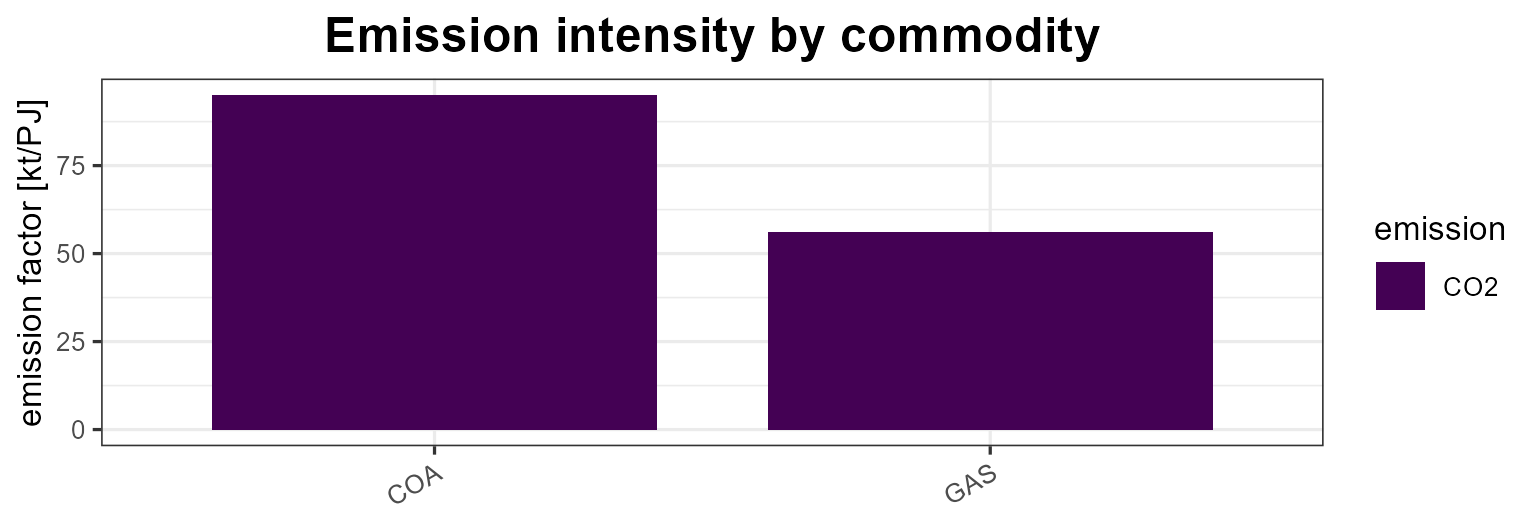
Processes
Processes are the model elements that move and
convert commodities. energyRt has seven of them, and every one has a
draw() method that renders a schematic of its inputs,
outputs, auxiliary commodities and key coefficients.
| Process | Role | Main commodity flow |
|---|---|---|
supply |
domestic source of a commodity | → out |
demand |
final consumption (a sink) | in → |
import |
purchase from the rest of the world | → out |
export |
sale to the rest of the world | in → |
trade |
move a commodity between regions | in ↔︎ out (per region) |
storage |
shift a commodity across time | in → → out |
technology |
convert input commodities into outputs | in → use → activity → out |
supply
A source of a commodity, with an availability bound and a cost (see the autoplot article for the by-year view of the same data).
SUP_COA <- newSupply(
  name = "SUP_COA", desc = "Coal supply", commodity = "COA", unit = "PJ",
  reserve = data.frame(region = "R1", res.up = 2e5),
  supply = data.frame(region = "R1", year = NA_integer_, timeslice = "ANNUAL",
                            ava.up = 1e3, cost = 10))
draw(SUP_COA)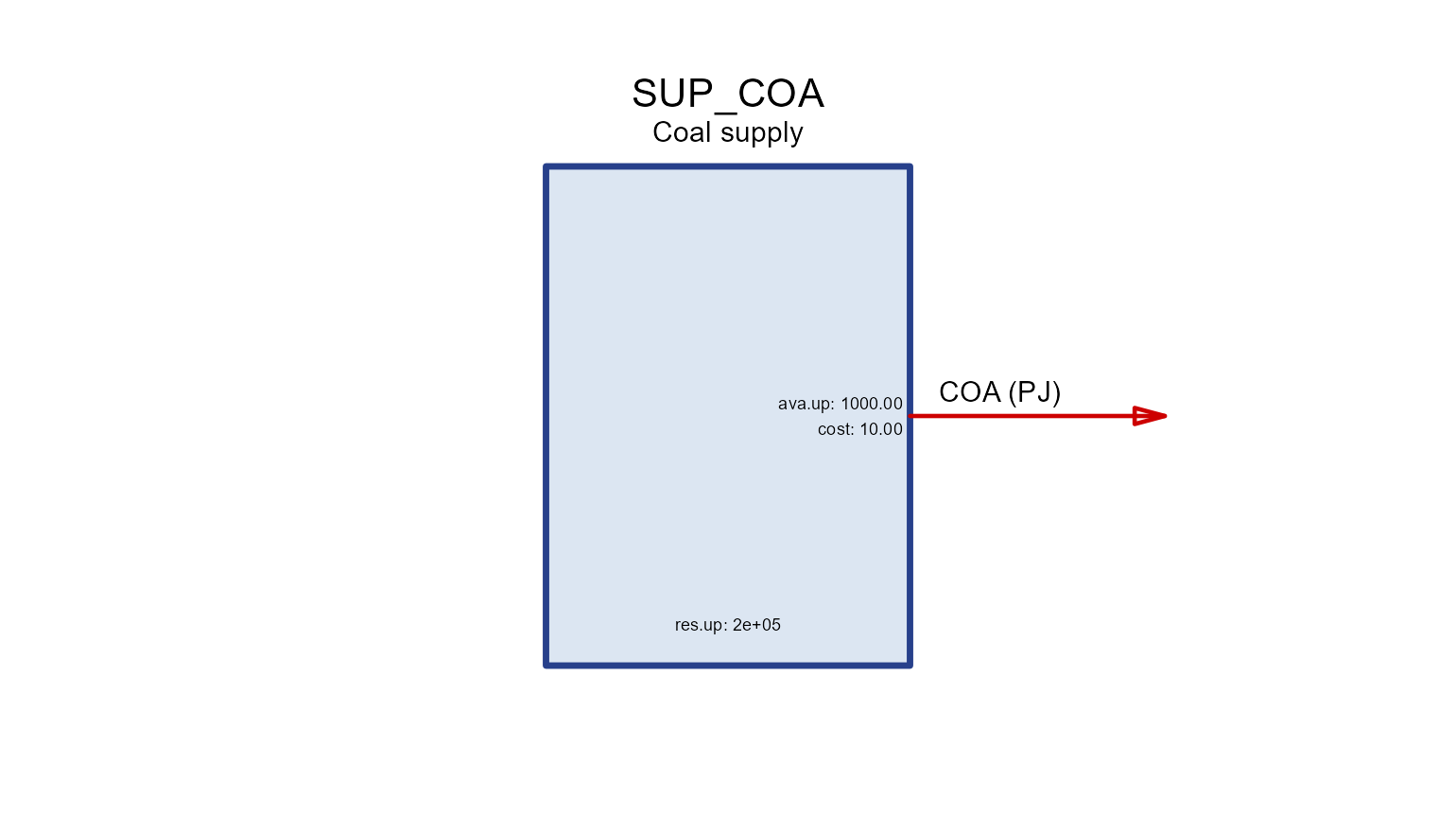
demand
A commodity sink; dem is the demanded quantity over
years/timeslices.
DEM_ELC <- newDemand(
  name = "DEM_ELC", desc = "Electricity demand", commodity = "ELC", unit = "GWh",
  demand = data.frame(region = "R1", year = c(2020, 2050), timeslice = "ANNUAL",
                   demand = c(100, 300)))
draw(DEM_ELC)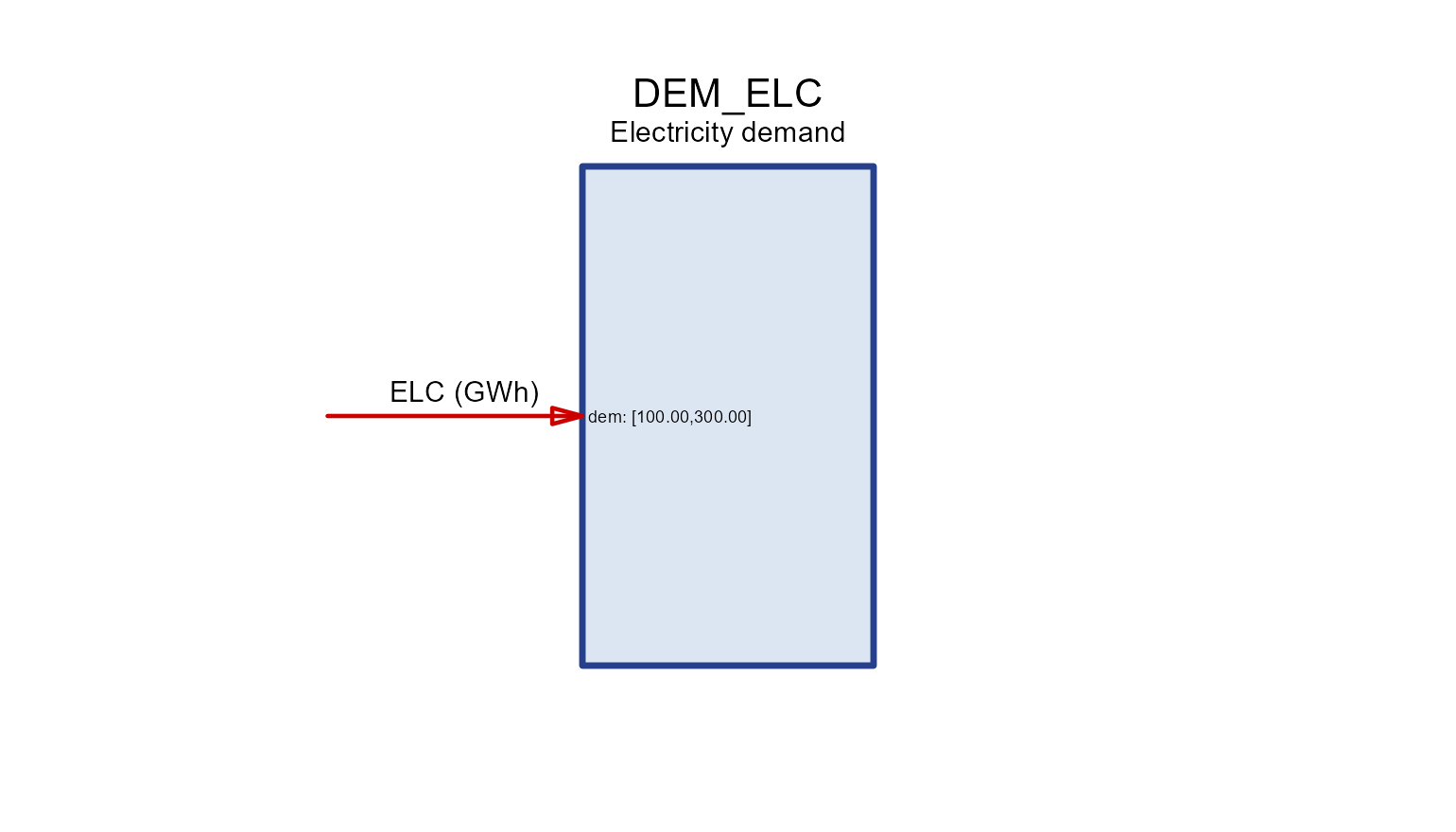
import / export
Trade with the “rest of the world” at a price, bounded
by imp.* / exp.*.
IMP_GAS <- newImport(
  name = "IMP_GAS", desc = "Gas import", commodity = "GAS", unit = "PJ",
  import = data.frame(region = "R1", year = c(2020, 2050), price = 6, imp.up = 500))
draw(IMP_GAS)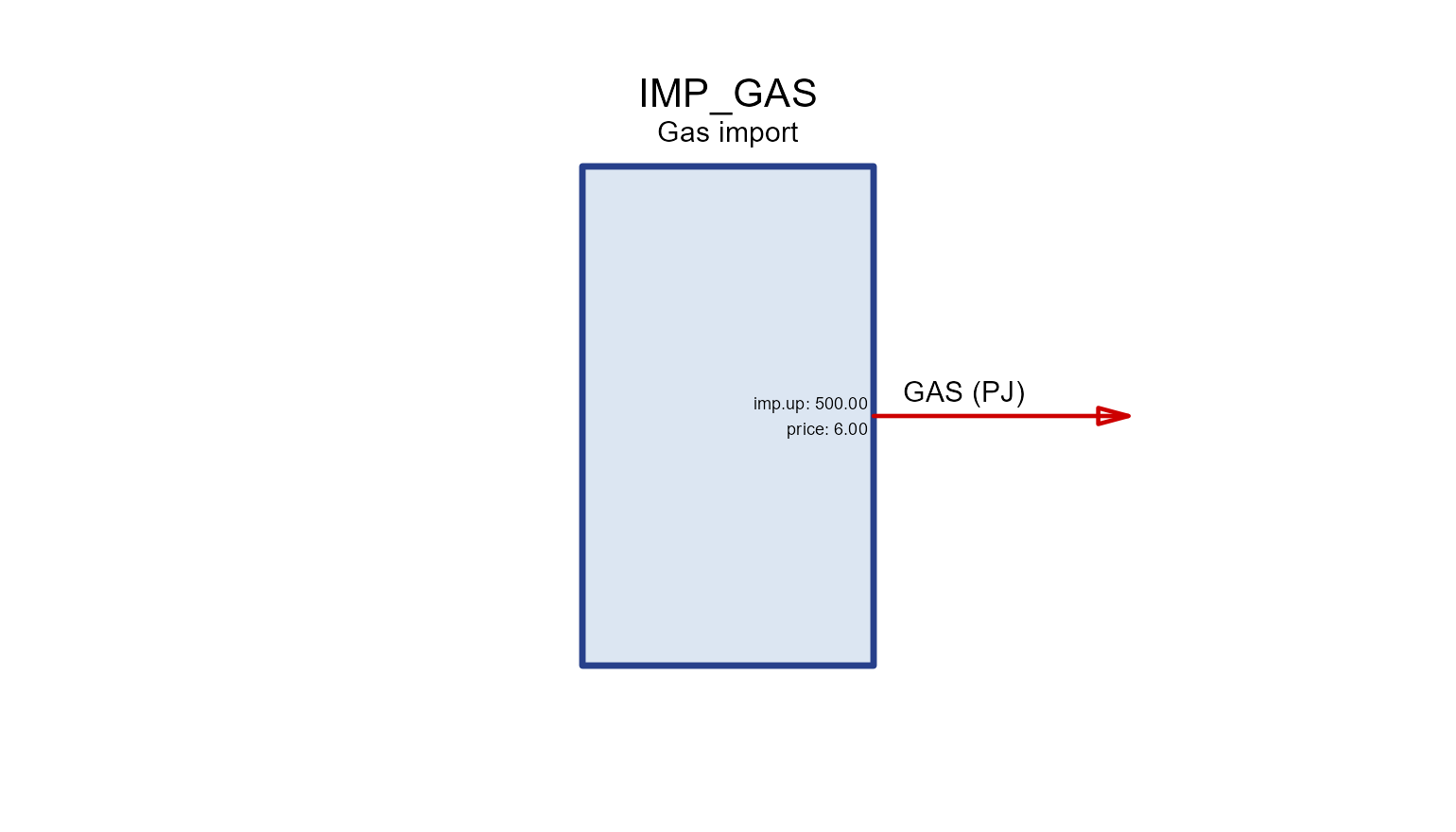
EXP_OIL <- newExport(
  name = "EXP_OIL", desc = "Oil export", commodity = "OIL", unit = "Mt",
  export = data.frame(region = "R1", year = c(2020, 2050), price = 500, exp.up = 100))
draw(EXP_OIL)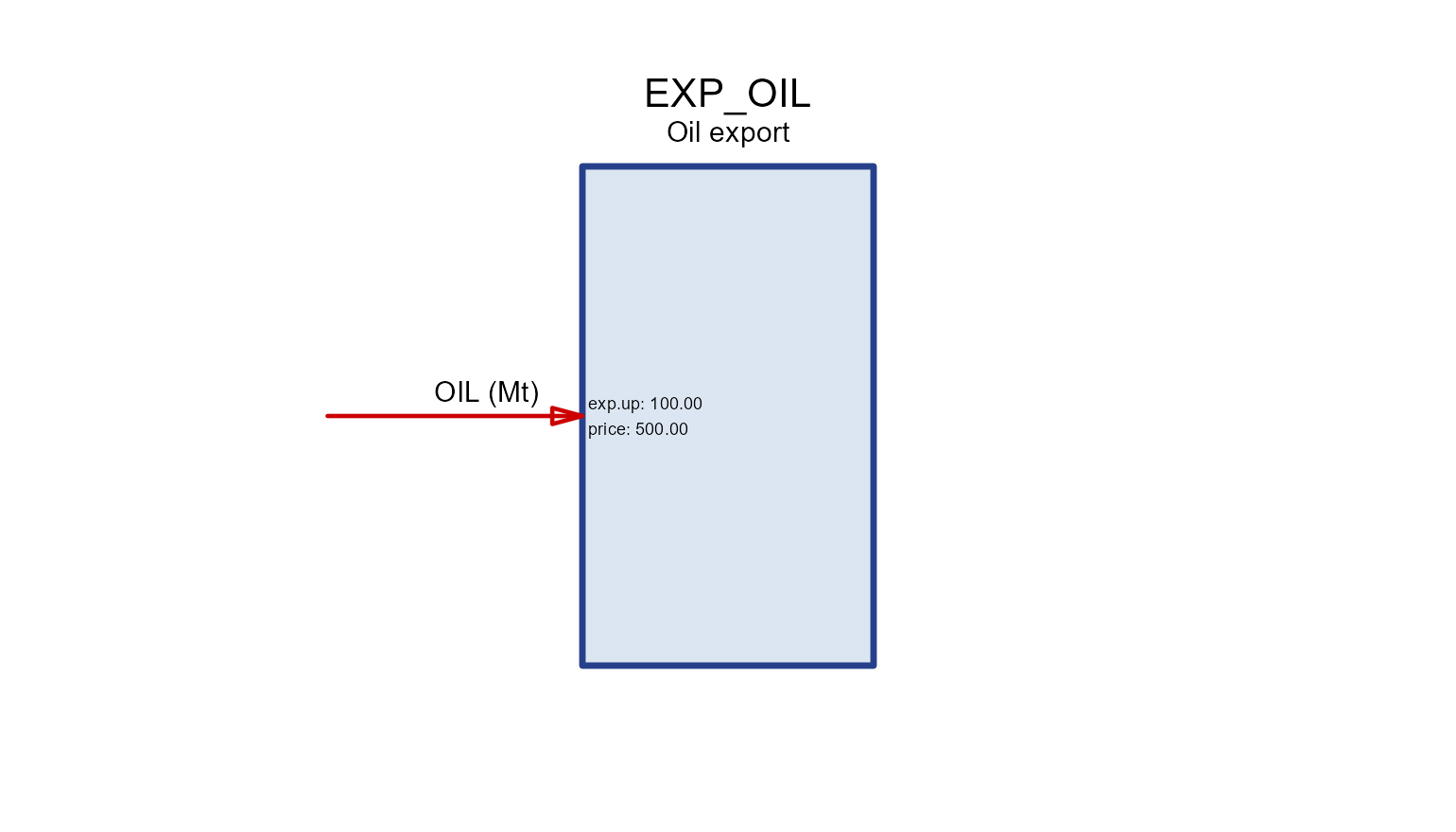
trade
Moves a commodity along routes (src →
dst) between regions with a transport efficiency
teff. draw() shows the flows for one node at a
time.
PIPE <- newTrade(
  name = "PIPE", desc = "Gas pipeline", commodity = "GAS",
  routes = data.frame(src = c("R1", "R2"), dst = c("R2", "R3")),
  trade  = data.frame(src = c("R1", "R2"), dst = c("R2", "R3"), teff = c(0.97, 0.96)))
draw(PIPE, node = "R2")   # imports from R1, exports to R3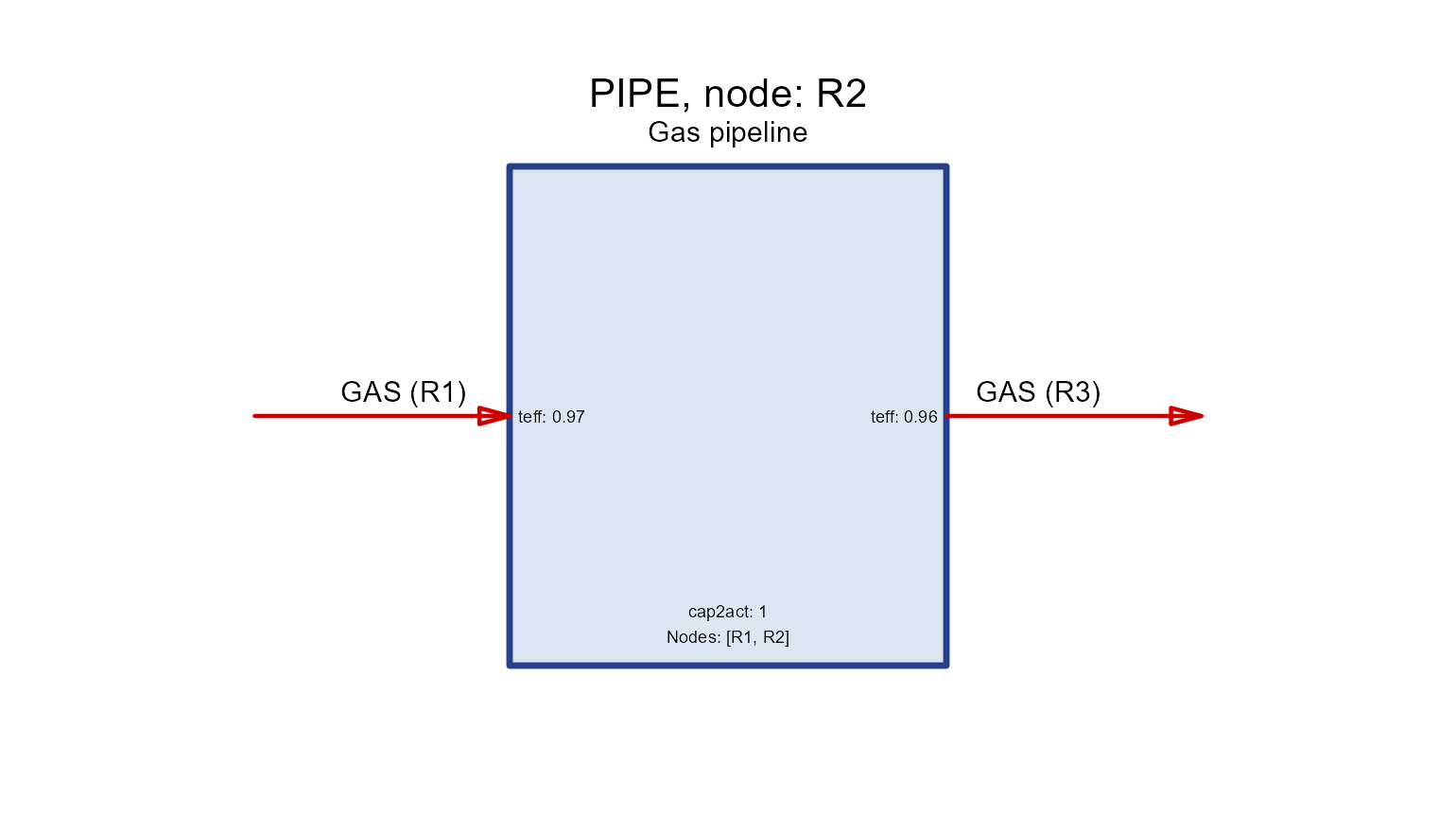
storage
Shifts a commodity across time. seff holds the
charging/discharging/holding efficiencies
(inpeff/outeff/stgeff) and
duration is the storage duration.
STG_ELC <- newStorage(
  name = "STG_ELC", desc = "Battery", commodity = "ELC",
  seff = data.frame(inpeff = 0.9, outeff = 0.9, stgeff = 0.999),
  duration = 4,                                   # 4 hours of storage per unit power
  aux  = data.frame(acomm = "MAT", unit = "kt"),
  # a storage has three parts, so an aux coupling must say WHICH capacity it
  # scales with: `out.` the discharger, `inp.` the charger, `stg.` the
  # reservoir. (A technology has one capacity and keeps the bare names.)
  aeff = data.frame(acomm = "MAT", out.ncap2ainp = 0.25))  # per new discharge capacity
draw(STG_ELC)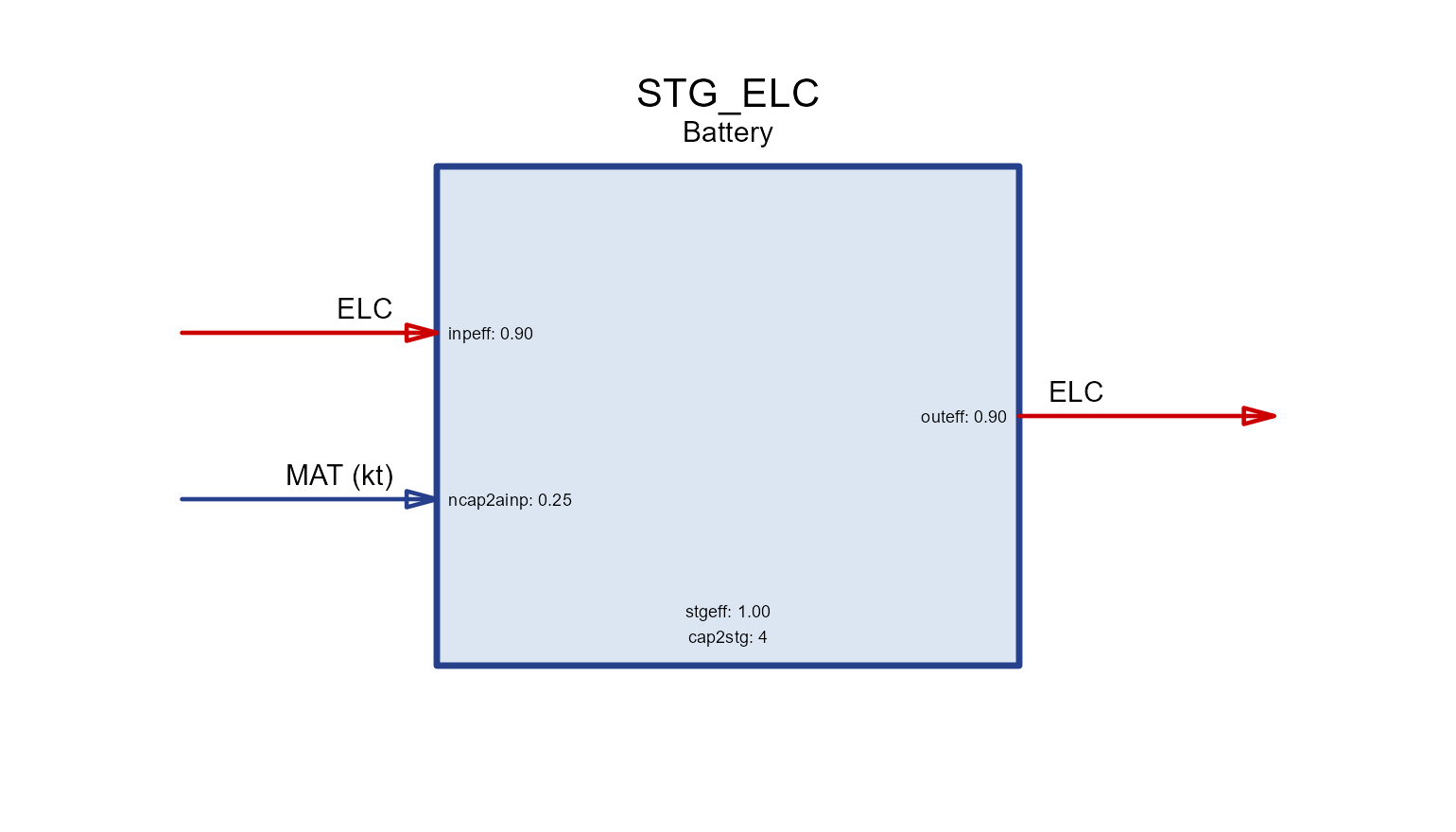
Anatomy of a technology
A technology converts input commodities
into output commodities. Read its diagram left-to-right
through four internal stages:
   input(s)  ──▶  use  ──▶  activity  ──▶  output(s)
cinp2use use2cact cact2cout-
cinp2use— how much of a common use each unit of a commodity input provides (e.g. converting fuels to a common energy basis). -
use2cact— use to the technology’s activity (the central variable that all costs, availability and capacity are tied to). -
cact2cout— activity to each output commodity (efficiency / yield). All three default to1.
BOILER <- newTechnology(
  name = "BOILER", desc = "Gas boiler",
  input  = data.frame(comm = "GAS",  unit = "PJ"),
  output = data.frame(comm = "HEAT", unit = "PJ"),
  ceff = data.frame(comm = c("GAS", "HEAT"),
                    cinp2use  = c(1,  NA),
                    cact2cout = c(NA, 0.9)),   # 90% efficiency
  cap2act = 1)
draw(BOILER)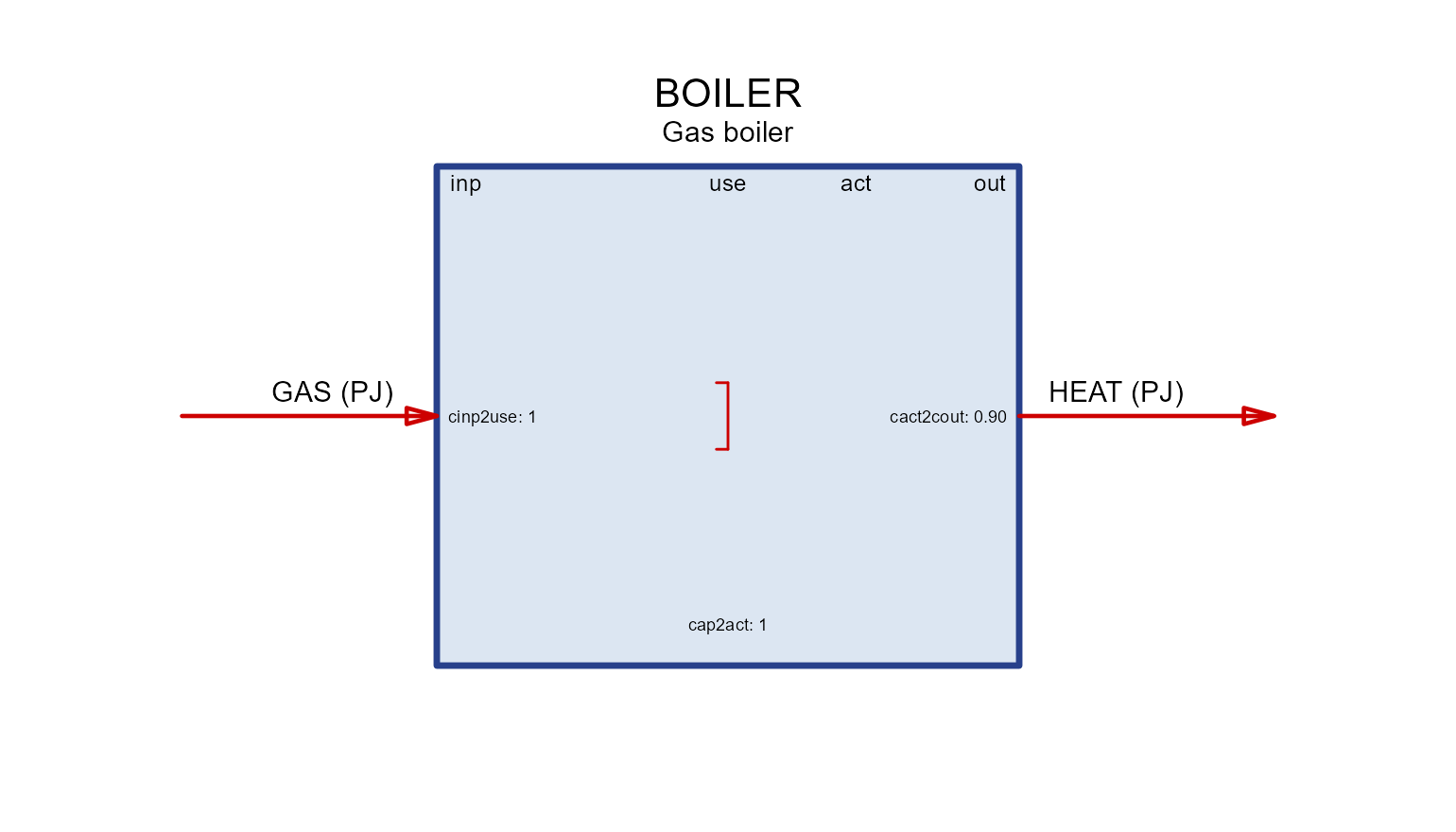
The four column headers in the box (inp,
use, act, out) are exactly these
stages; each coefficient is printed next to the flow it scales.
Groups and shares
When several commodities are interchangeable on the input (or output)
side, put them in a group. A group is converted to
use once (via ginp2use in geff), and
each member’s contribution is bounded by a share
(grp.share.lo/grp.share.up/grp.share.fx
– named for the GROUP they share, since cap.share.fx and
act.share.* on @cluster are different things).
cinp2ginp converts each commodity into the group’s common
unit.
CHP <- newTechnology(
  name = "CHP", desc = "Co-firing plant (coal + biomass)",
  input = data.frame(comm = c("COA", "BIO"), group = "fuel", unit = "PJ"),
  output = data.frame(comm = "ELC", unit = "GWh"),
  group = data.frame(group = "fuel", desc = "Blended fuel", unit = "PJ"),
  # inputs are PJ but the output is GWh: the PJ->GWh conversion (1 PJ =
  # 277.78 GWh) rides on `ginp2use`, so use/activity are measured in GWh
  geff  = data.frame(group = "fuel", ginp2use = 277.78),
  ceff  = data.frame(comm = c("COA", "BIO", "ELC"),
                    cinp2ginp = c(1, 1, NA),
                    cact2cout = c(NA, NA, 0.4),     # 40% efficiency
                    grp.share.up = c(1.0, 0.3, NA)),   # max 30% biomass
  cap2act = 8760)                                   # 1 GW x 8760 h = 8760 GWh
draw(CHP)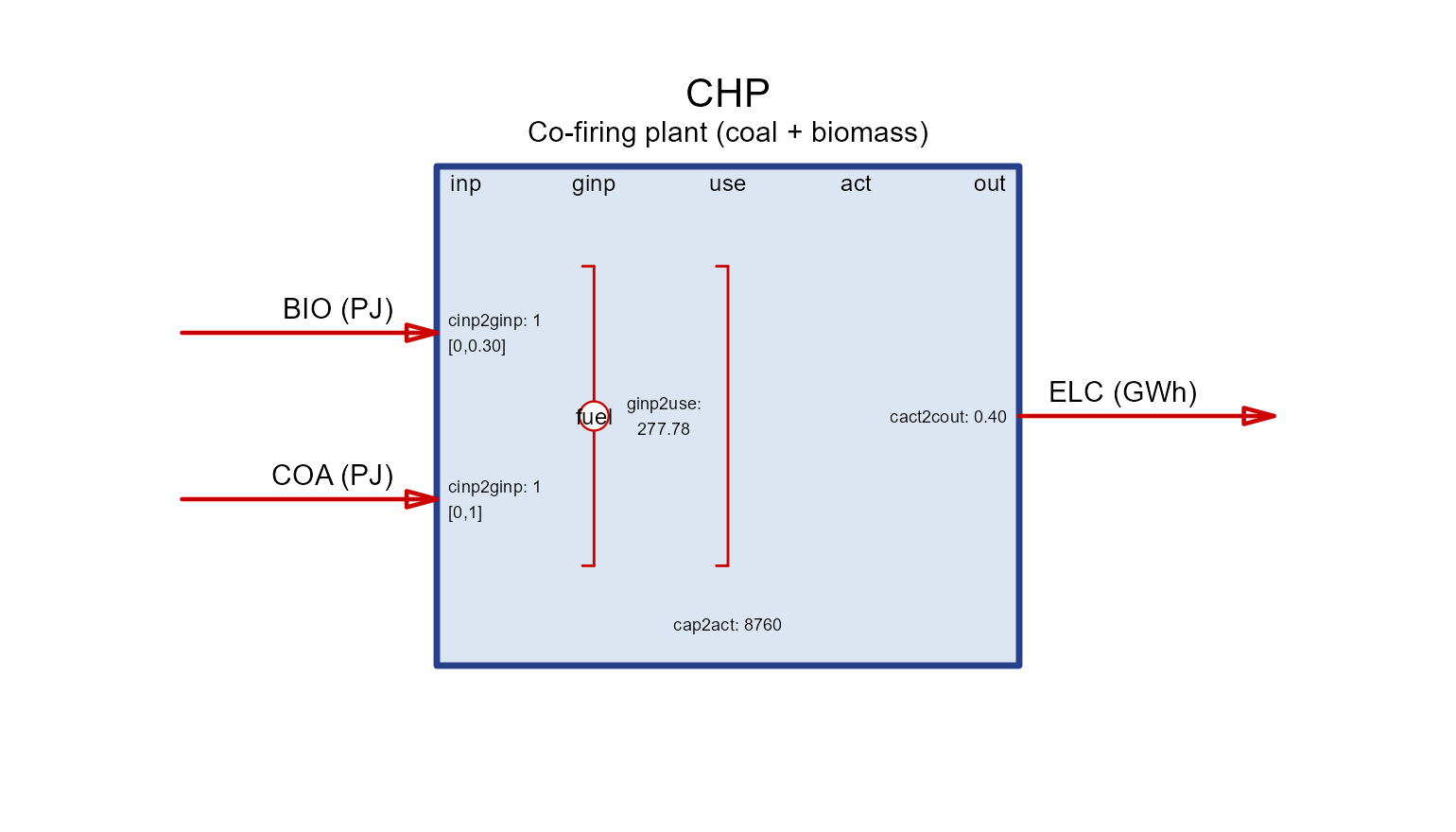
The share range is drawn in square brackets next to each grouped commodity.
Mixed units live in the coefficients. When inputs
and outputs use different units the conversion has to appear somewhere,
so that use, activity and cap2act agree —
and a chain coefficient is the natural place for it. Here the fuels are
PJ and electricity is GWh: ginp2use = 277.78 converts the
fuel group to GWh (so the technology operates in GWh), and
cap2act = 8760 matches (1 GW × 8760 h). You do not have to
work the factor out by hand: convert("PJ", "GWh", 1) gives
it. See the Units article for where each unit is declared and
how convert() finds a factor.
Activity, capacity and units
Everything a technology does is measured by its
activity. Installed capacity limits
the maximum activity through the scalar
cap2act:
-
cap2act— “how much product (activity, or output commodity if identical) is produced per unit of capacity”. Its own units are activity per capacity, so the number depends on both. A power plant rated inGWrunning flat out for a year produces 8760 GWh, socap2act = 8760with activity inGWh— andcap2act = 31.536for the same plant with activity inPJ(1 GW × 8760 h = 31.536 PJ), which is the convention TOPIA I uses. - Capacity itself is bounded in the
capacityslot:stock(pre-existing),cap.lo/up/fx(total),ncap.lo/up/fx(new builds) andret.lo/up/fx(retirement). Availability factorsaf/afsbound activity within capacity:af.upcaps activity in each timeslice as a fraction of capacity — a maximum capacity factor per slice, withaf.loas a must-run floor — whileafsbounds activity summed over a timeframe, soafswithtimeslice = "ANNUAL"is the annual capacity-factor bound (e.g.afs.lo = 0.4forces at least 40% annual utilization). A third variant,afc.*in theceffslot, applies the same capacity-relative bound to an individual commodity flow instead of total activity.
Capacity in input vs. output units
Because capacity is tied to activity, whether it is
expressed in input or output units depends on where
you place the efficiency. Keep cinp2use = 1 and put the
loss on the output (cact2cout = 0.9) and activity tracks
the input — so capacity is in fuel-input units. Move
the efficiency to the input side instead and capacity becomes an
output rating:
# capacity rated on OUTPUT (e.g. a 1 GW_e turbine): activity == output
BOILER_out <- newTechnology(
  name = "BOILER_out", desc = "Boiler rated by heat output",
  input  = data.frame(comm = "GAS",  unit = "PJ"),
  output = data.frame(comm = "HEAT", unit = "PJ"),
  ceff = data.frame(comm = c("GAS", "HEAT"),
                    cinp2use  = c(1 / 0.9, NA),   # efficiency on the input side
                    cact2cout = c(NA, 1)),        # activity == heat output
  cap2act = 1)
draw(BOILER_out)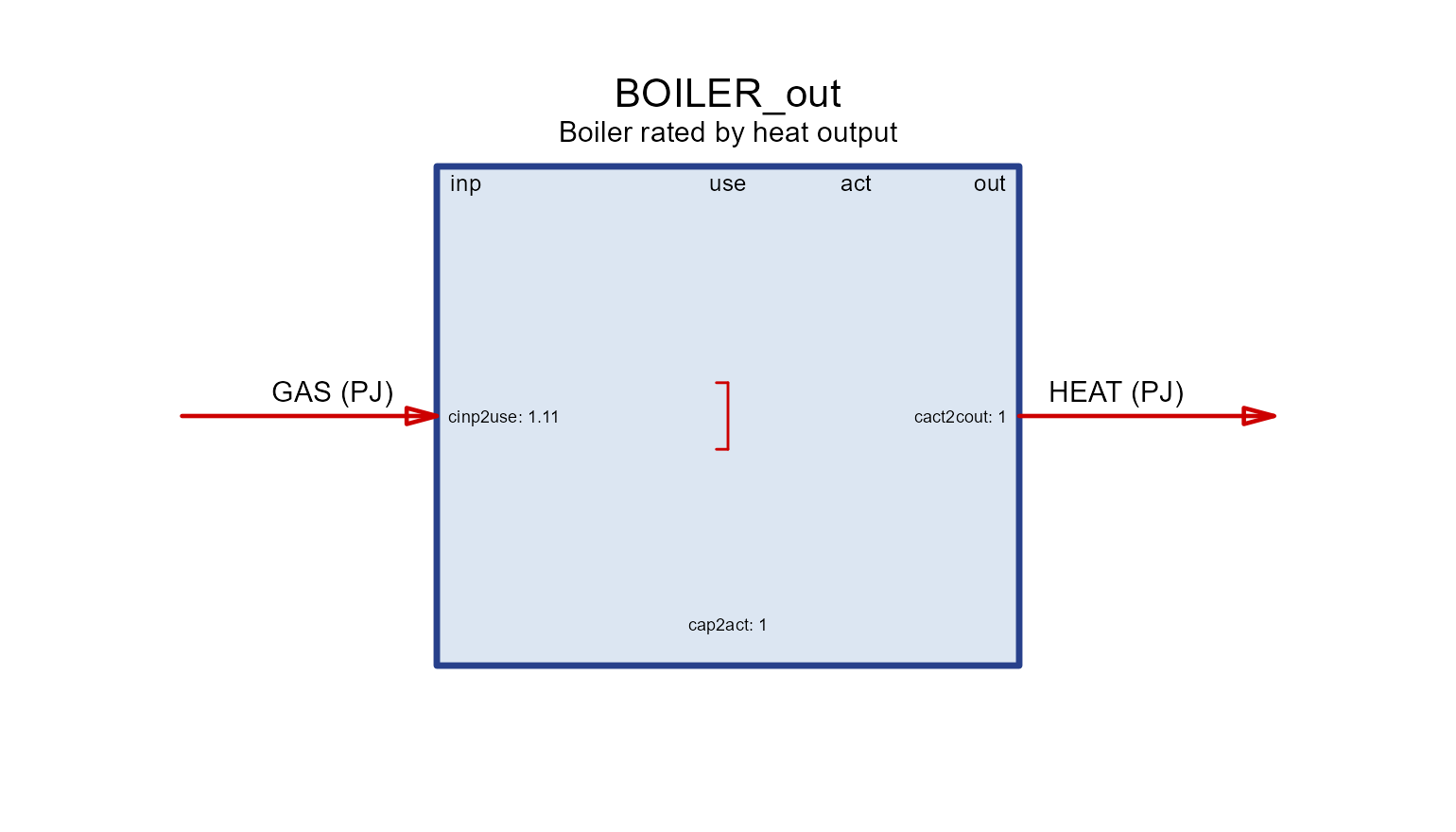
Both boilers have the same 90% efficiency; they differ only in what a unit of capacity means (fuel input vs. heat output).
Auxiliary commodities
Auxiliary commodities are extra flows tracked
alongside the main conversion — emissions (NOx,
SO2, CH4, PM10,
PM25), recovered HEAT, land, cooling
WATER, construction MATerials, by-products.
They are declared in aux and linked in aeff by
a coefficient named <driver>2a<out|inp>:
- the driver is what scales the flow:
cinp(commodity input),cout(output),act(activity),cap(installed capacity),ncap(new capacity), or storage terms; -
…2aoutproduces the aux commodity (emissions, recovered heat, by-products);…2ainpconsumes it (water, materials, energy).
Each tab isolates one driver on the same base technology
(GAS → ELC).
aux_tech <- function(param, value, acomm = "AUX", unit = "unit") {
  aeff <- data.frame(acomm = acomm, stringsAsFactors = FALSE)
  aeff[[param]] <- value
  newTechnology(
    name = paste0("TECH_", param), desc = paste0("aux via ", param),
    input  = data.frame(comm = "GAS", unit = "PJ"),
    output = data.frame(comm = "ELC", unit = "GWh"),
    ceff   = data.frame(comm = c("GAS", "ELC"), cinp2use = c(1, NA), cact2cout = c(NA, 0.4)),
    aux    = data.frame(acomm = acomm, unit = unit),
    aeff   = aeff)
}
act2aout
Produced per unit of activity — the usual way to
attach combustion NOx.
draw(aux_tech("act2aout", 0.20, "NOx", "kt"))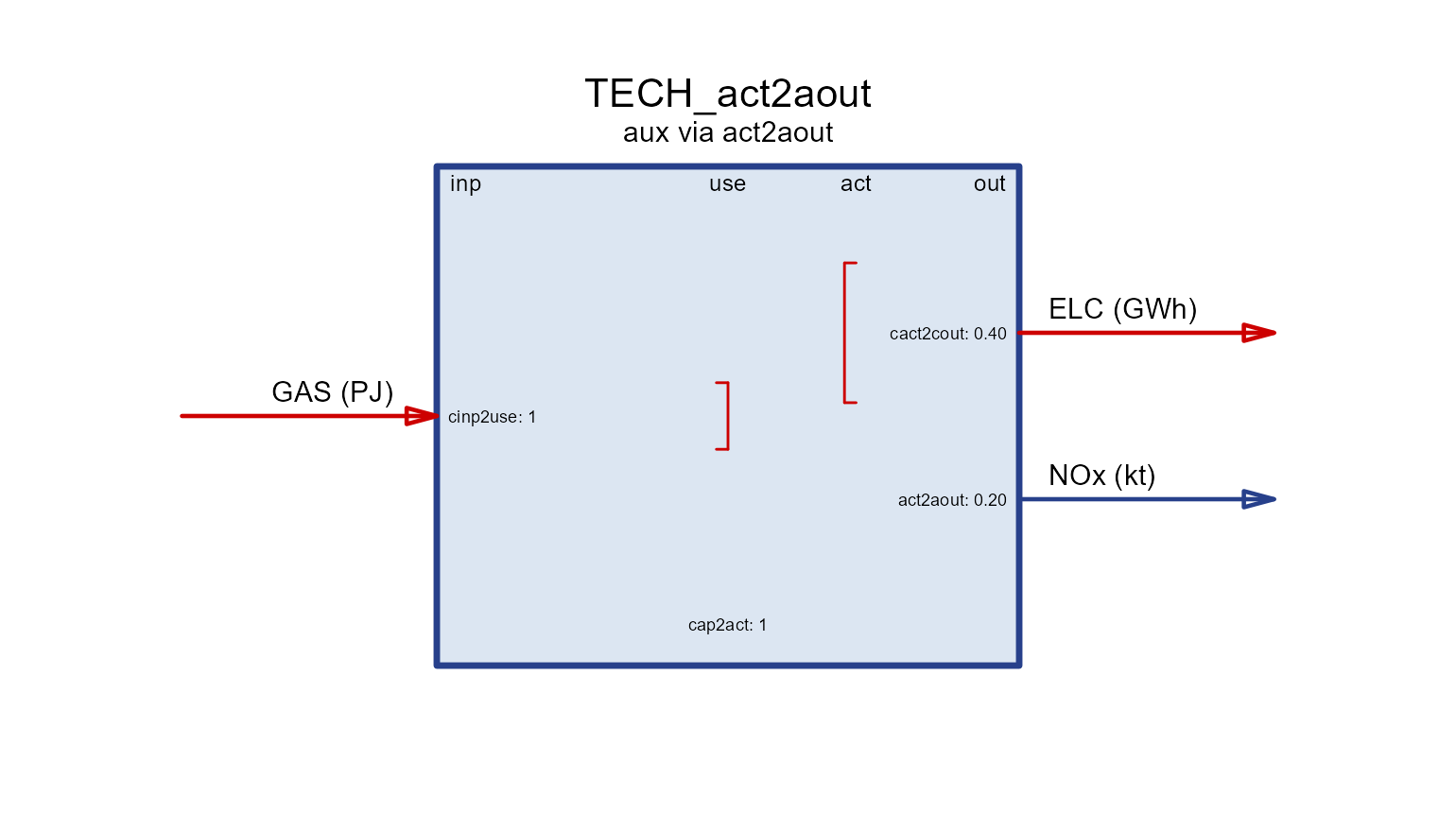
cout2aout
Produced per unit of output commodity —
e.g. SO2 scaling with generation.
draw(aux_tech("cout2aout", 0.01, "SO2", "kt"))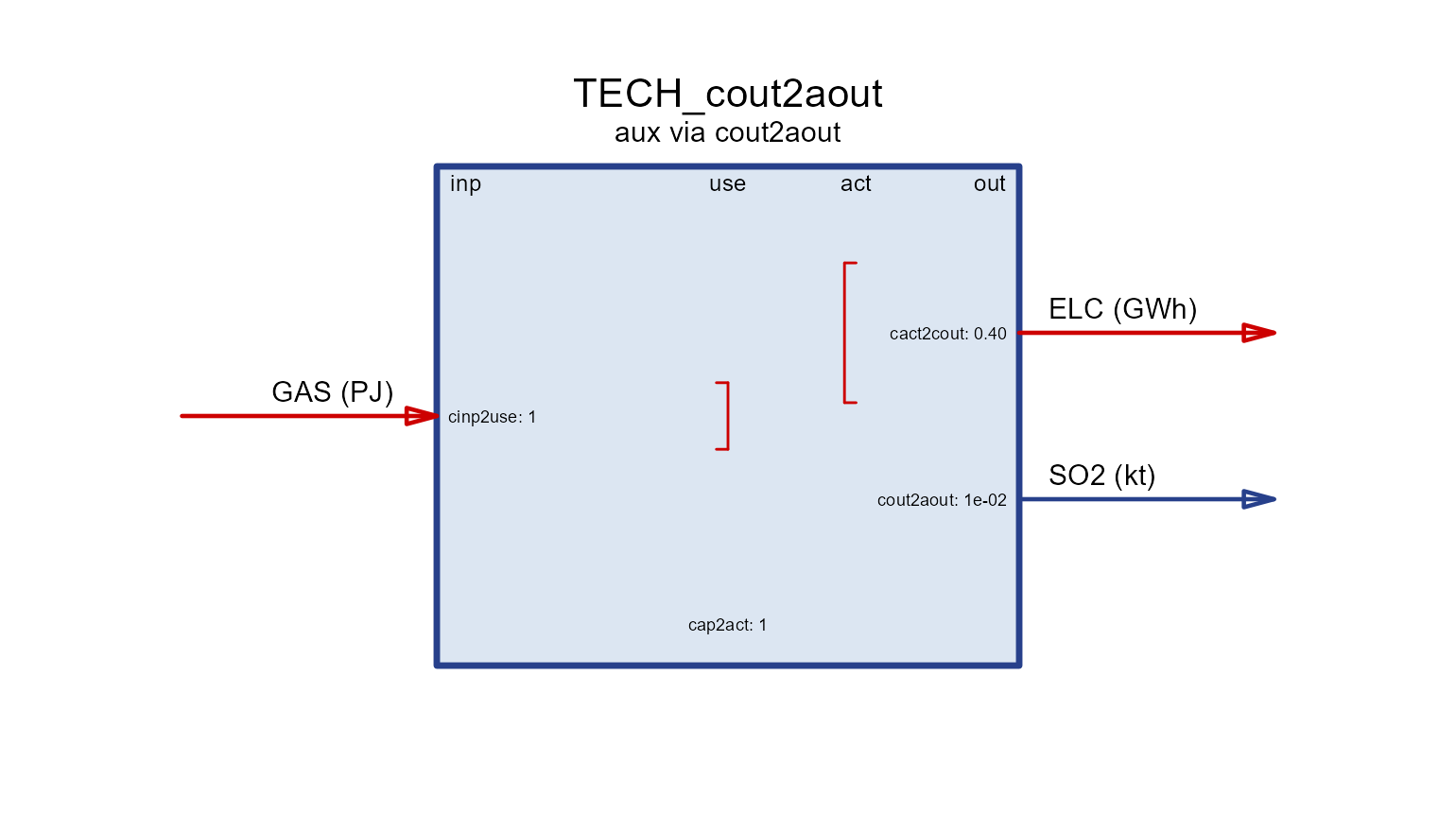
cinp2aout
Produced per unit of input commodity — e.g. fugitive
CH4 from the fuel feed.
draw(aux_tech("cinp2aout", 0.001, "CH4", "kt"))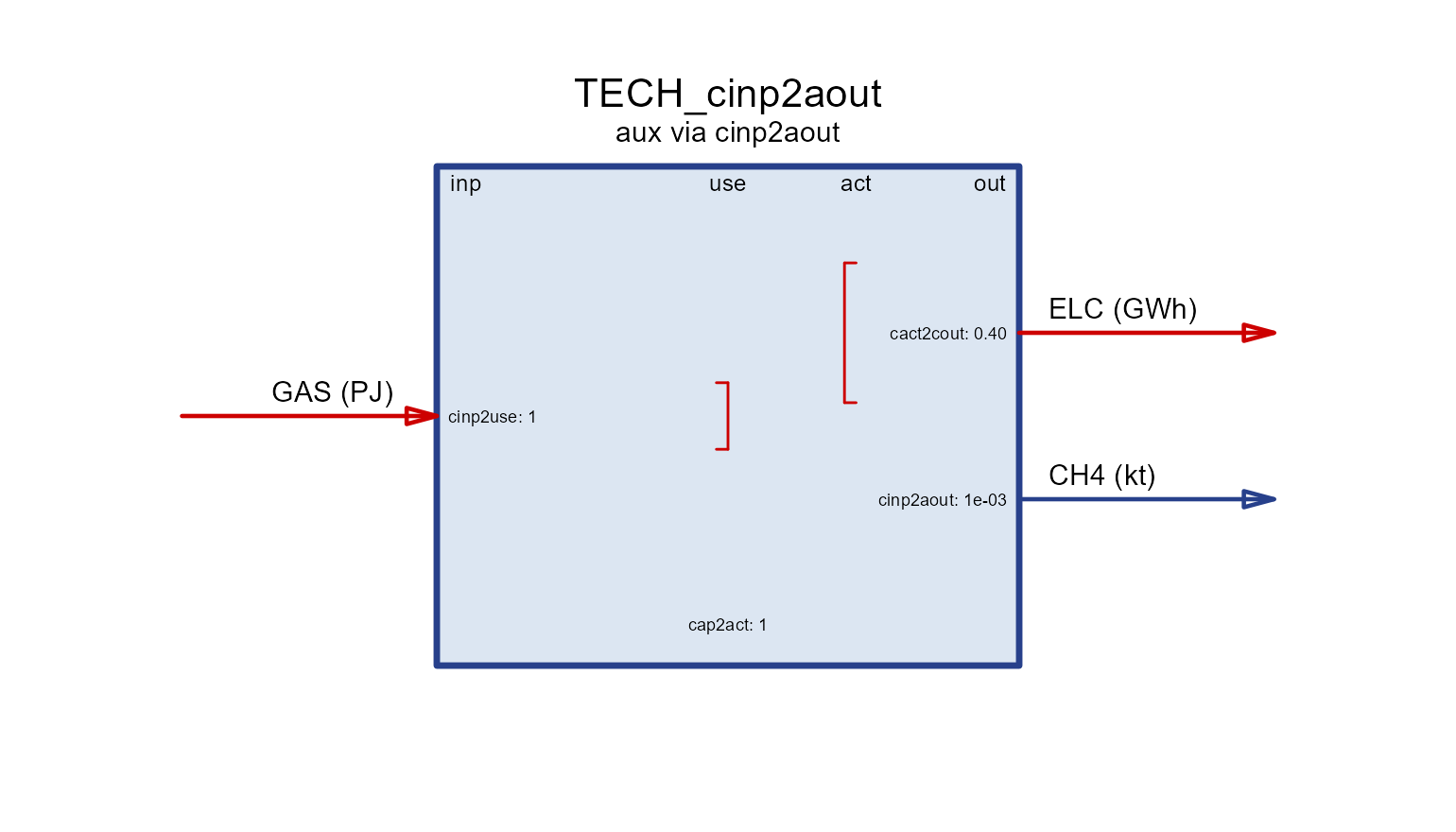
cap2aout
Produced per unit of installed capacity (e.g. land occupied while the plant stands).
draw(aux_tech("cap2aout", 10, "LAND", "km2"))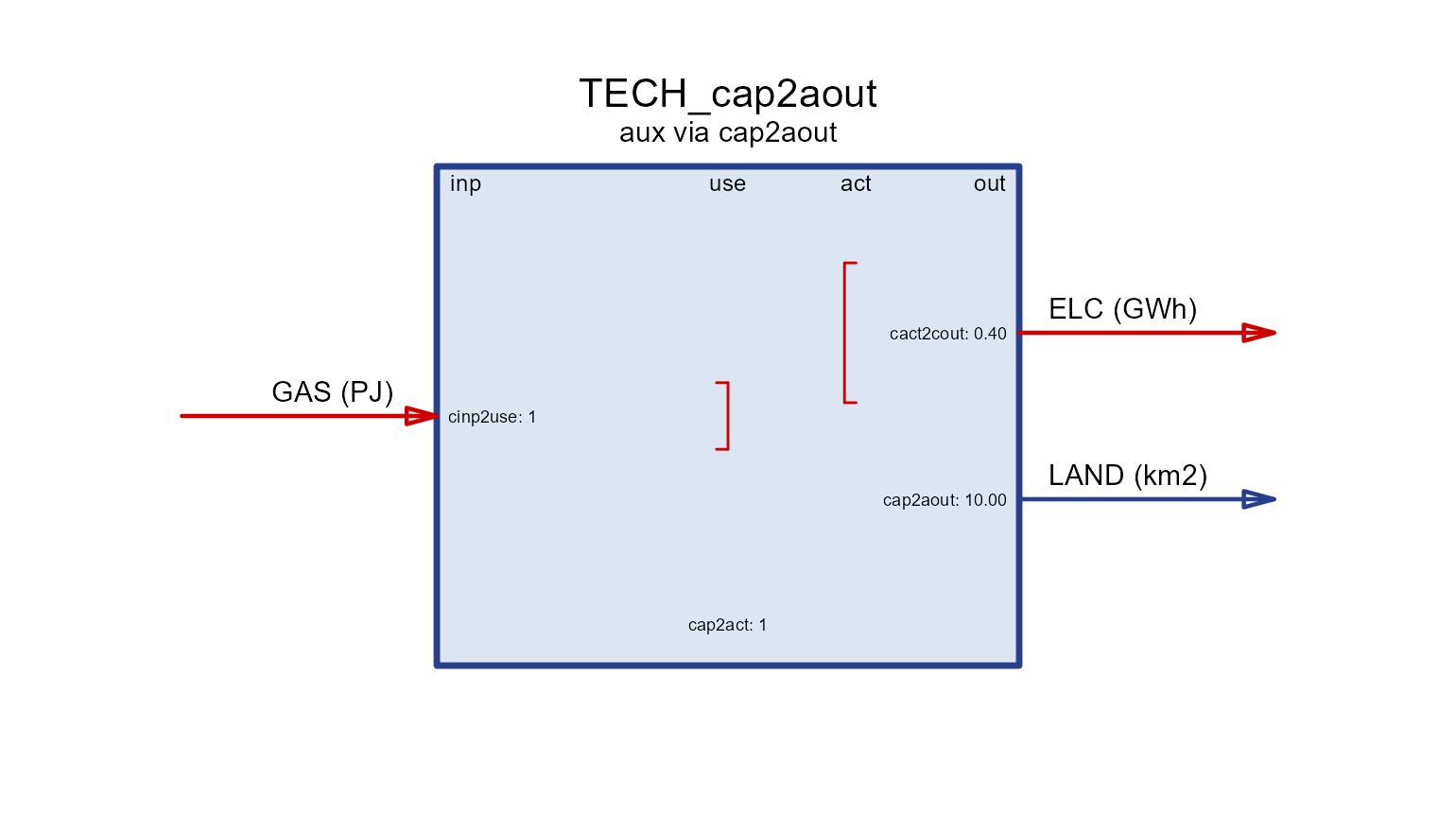
ncap2aout
Produced per unit of new capacity — one-off,
e.g. construction-dust PM10.
draw(aux_tech("ncap2aout", 0.5, "PM10", "kt"))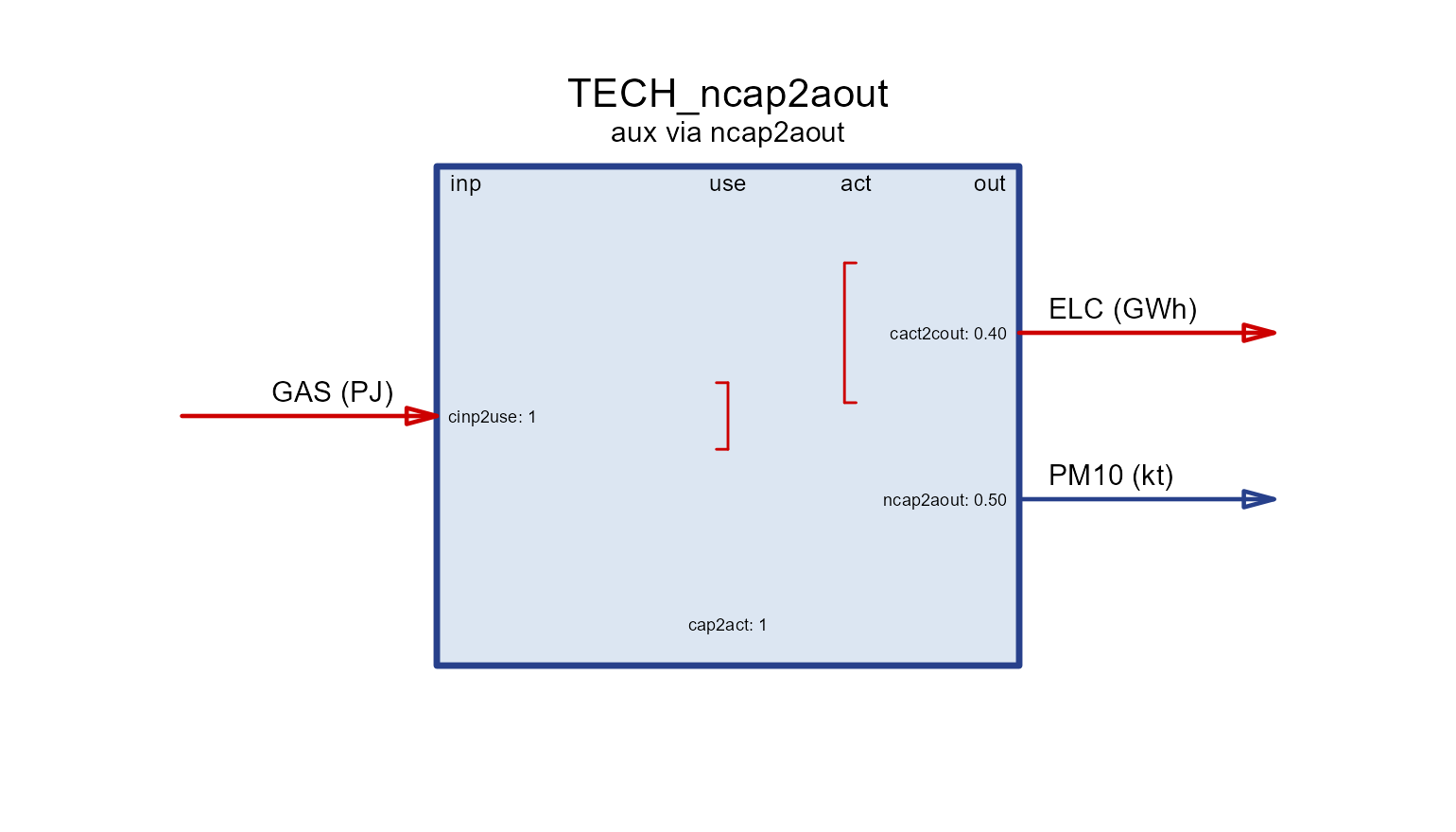
act2ainp
Consumed per unit of activity — e.g. cooling
WATER.
draw(aux_tech("act2ainp", 0.1, "WATER", "Mm3"))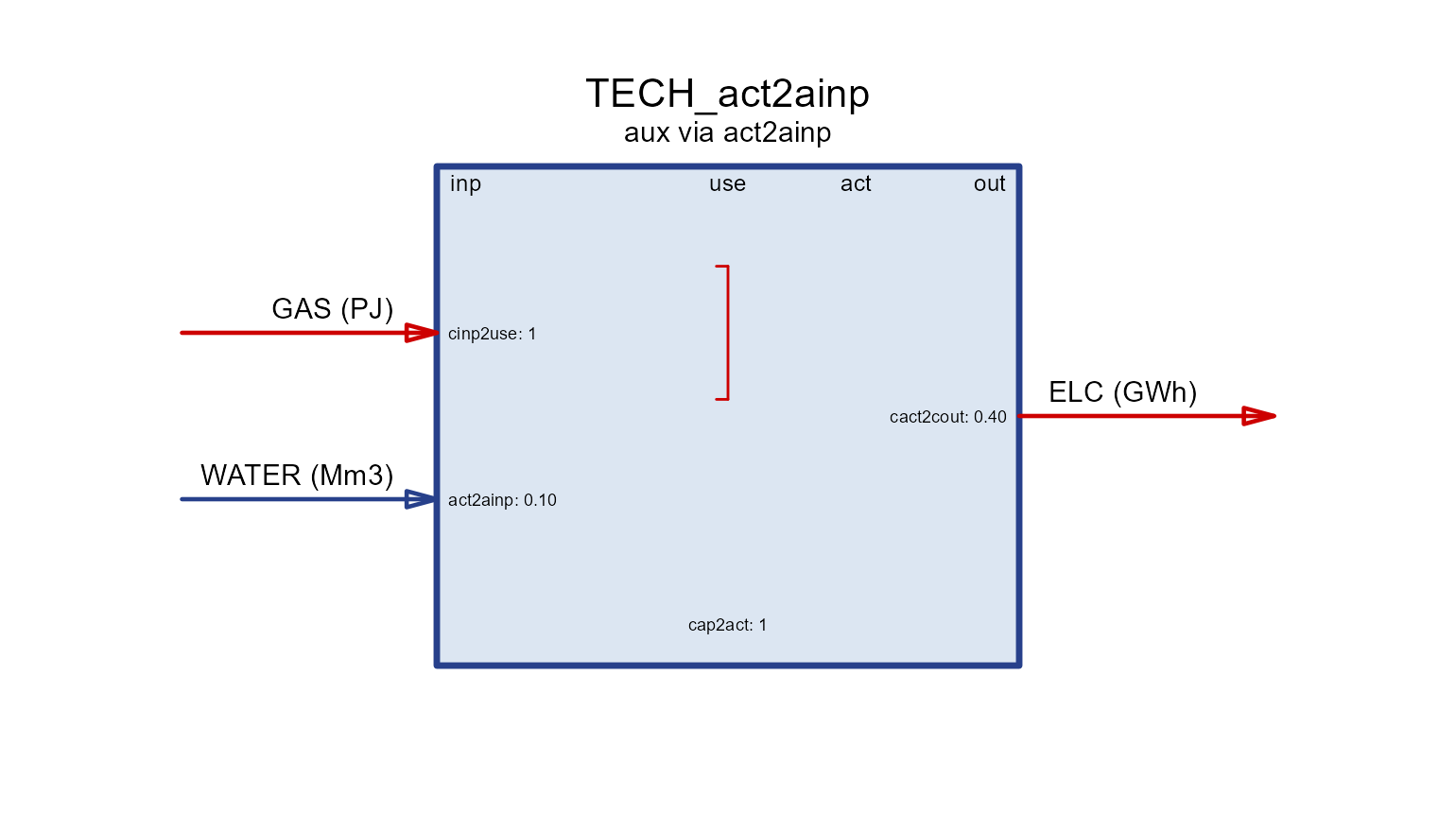
cap2ainp
Consumed per unit of capacity — a stock of
MATerial tied up in the plant.
draw(aux_tech("cap2ainp", 4, "MAT", "kt"))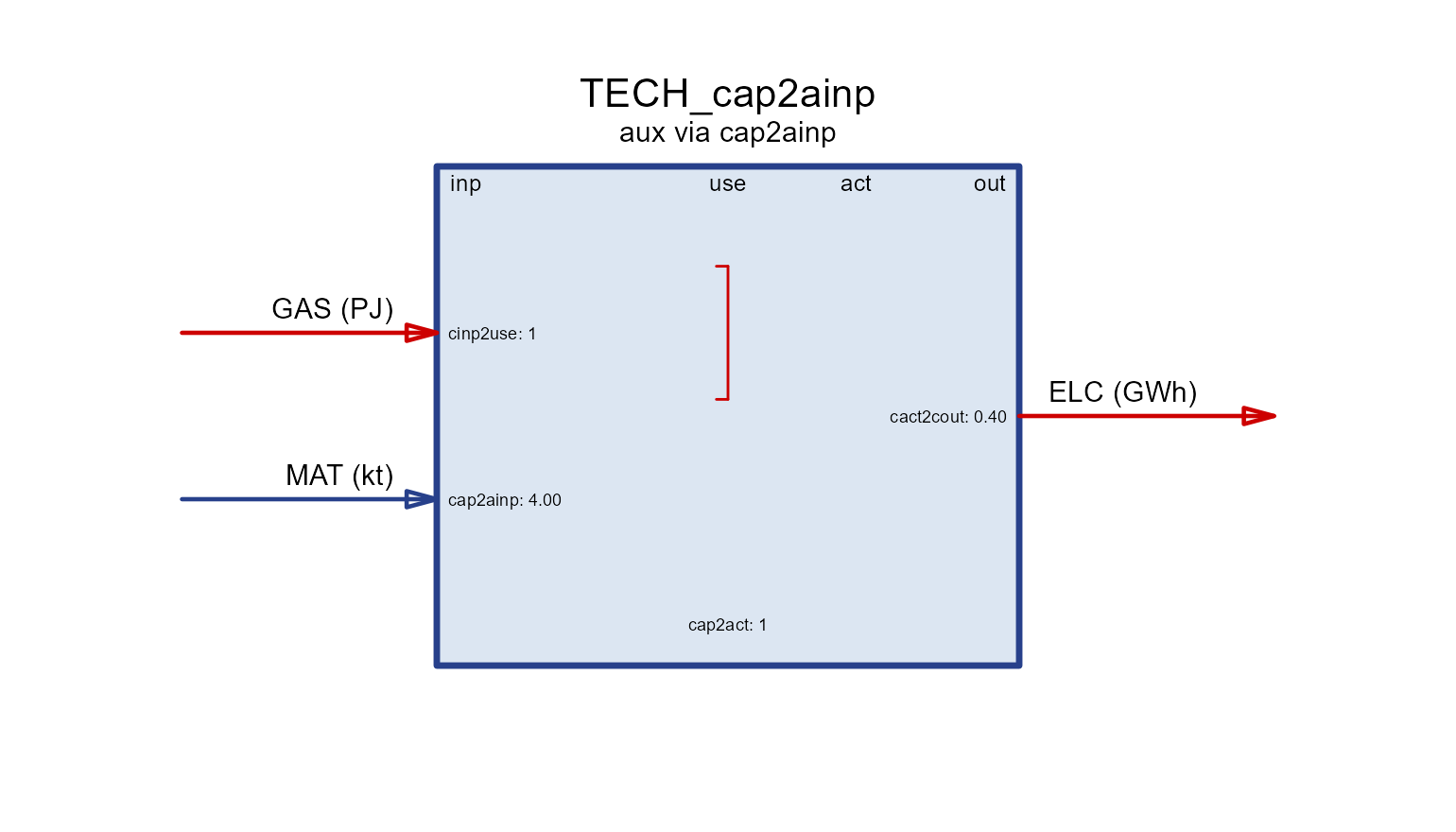
ncap2ainp
Consumed per unit of new capacity —
MATerials used to build (as in the storage example
above).
draw(aux_tech("ncap2ainp", 2, "MAT", "kt"))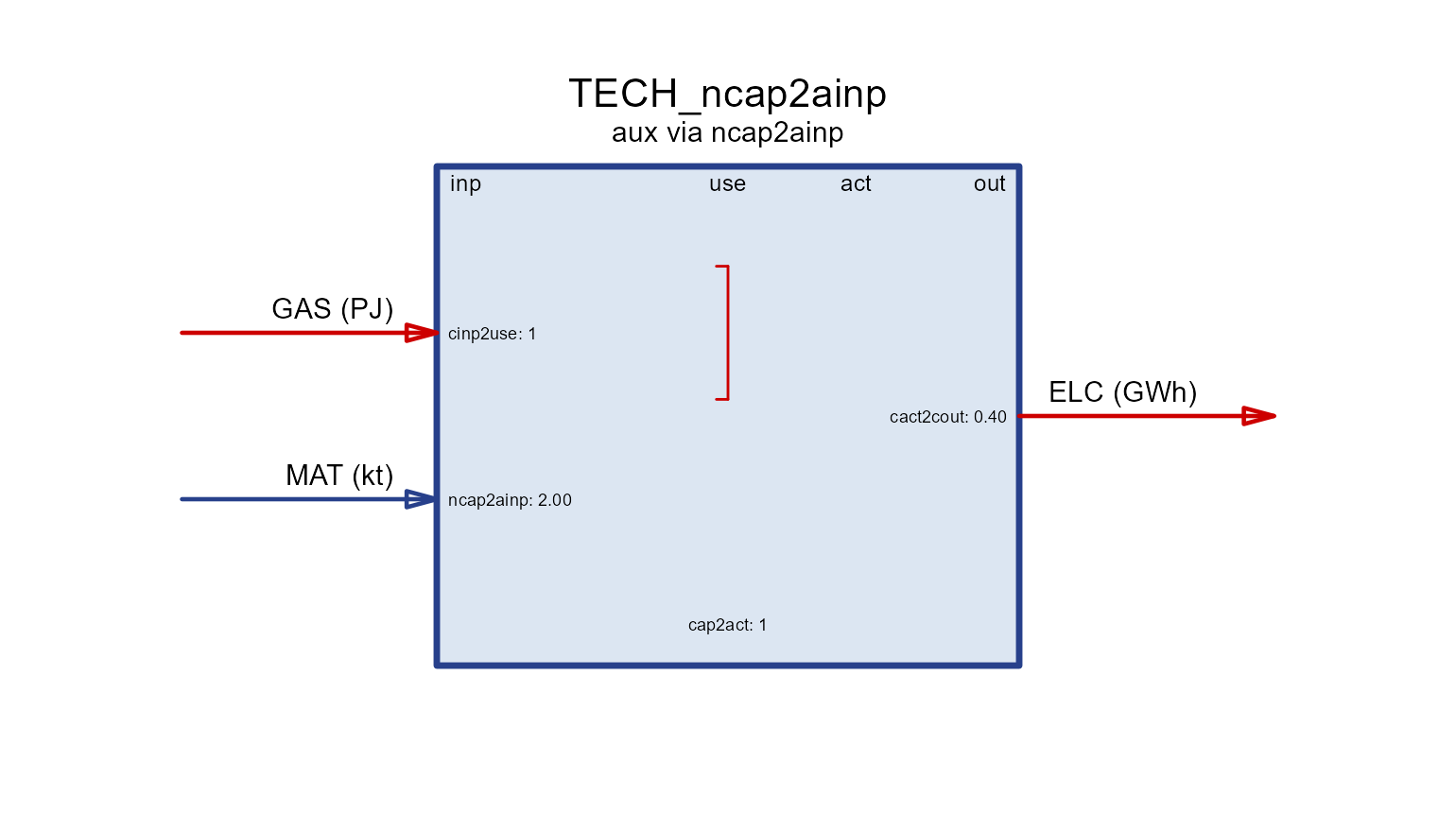
A full aux inventory
Real technologies carry several aux flows at once. A coal plant might
emit NOx, SO2, CH4,
PM10 and PM25, recover HEAT as a
by-product, and consume cooling WATER and construction
MATerials — all in a single
aux/aeff pair, each row filling only the
driver column that applies:
PLANT <- newTechnology(
  name = "PLANT", desc = "Coal plant with a full aux inventory",
  input  = data.frame(comm = "COA", unit = "PJ"),
  output = data.frame(comm = "ELC", unit = "GWh"),
  ceff = data.frame(comm = c("COA", "ELC"), cinp2use = c(1, NA), cact2cout = c(NA, 0.4)),
  aux  = data.frame(
    acomm = c("NOx", "SO2", "CH4", "PM10", "PM25", "HEAT", "WATER", "MAT"),
    unit  = c("kt",  "kt",  "kt",  "kt",   "kt",   "PJ",   "Mm3",   "kt")),
  aeff = data.frame(
    acomm     = c("NOx", "SO2", "CH4",  "PM10", "PM25", "HEAT", "WATER", "MAT"),
    act2aout  = c(0.20,  0.01,  0.001,  0.05,   0.03,   0.9,    NA,      NA),
    act2ainp  = c(NA,    NA,    NA,     NA,     NA,     NA,     0.1,     NA),
    ncap2ainp = c(NA,    NA,    NA,     NA,     NA,     NA,     NA,      2)))
draw(PLANT)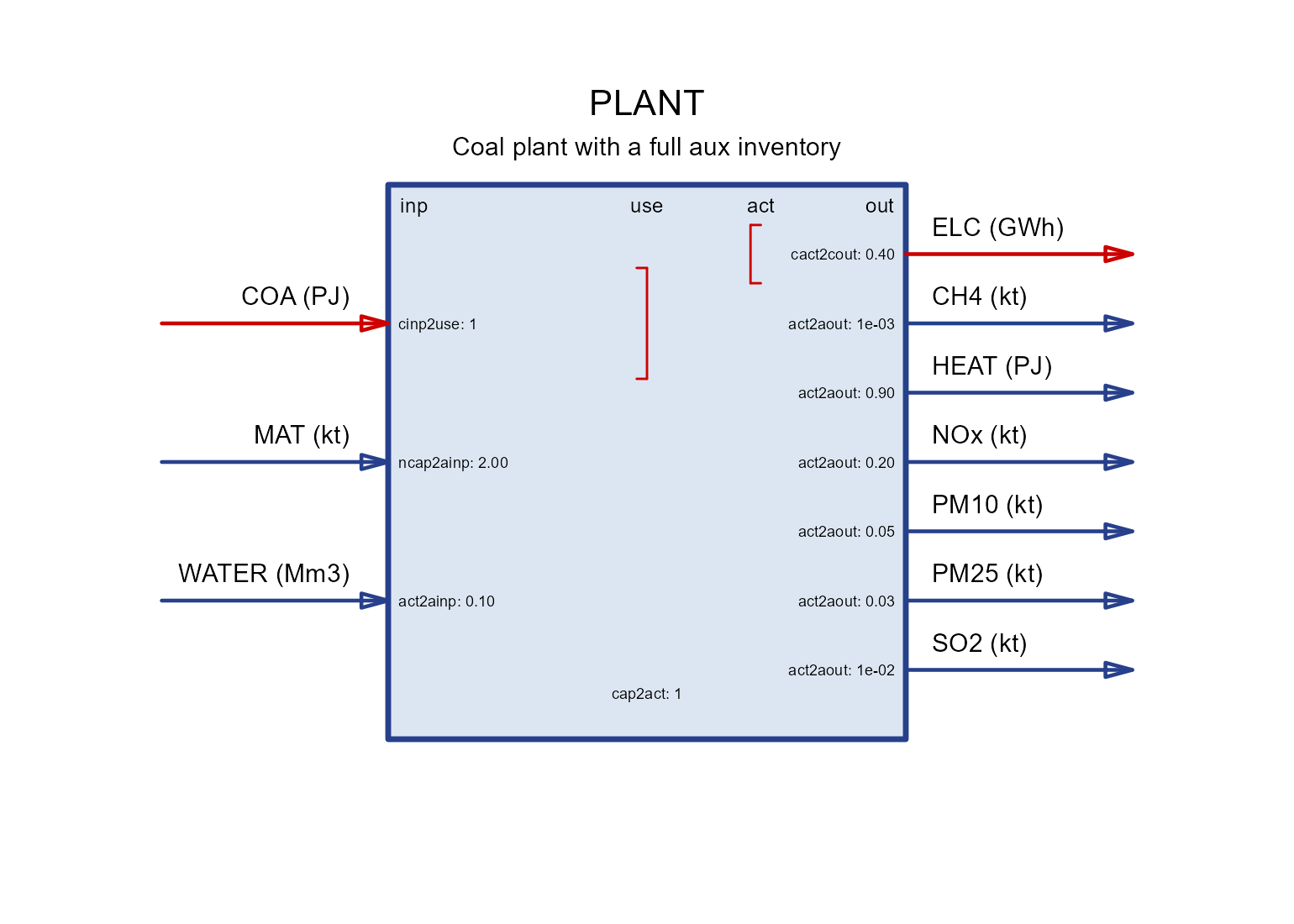
Timeframe (operating frequency)
A technology operates at a timeframe — the level of
the calendar it is dispatched on. By default it is the finest
(highest-frequency) timeframe among the commodities it uses: a
plant producing hourly ELC runs hourly, while one producing
only annual STEEL runs annually. Set
timeframe = to force a coarser level (e.g. run an
electricity plant at "SEASON" rather than
"HOUR" to shrink the model).
newTechnology(
  name = "WIND", input = data.frame(comm = character()),
  output = data.frame(comm = "ELC", unit = "GWh"),
  timeframe = "HOUR")            # dispatch hourly (else inferred from commodities)
User constraints
Beyond the physics baked into each process, you can add your own
linear constraints on the model variables.
newConstraint() is the low-level form: you name the raw
model variable, its dimension (for.each), the relation
(eq) and a right-hand side (rhs). A classic
use is an economy-wide emission cap:
CO2CAP <- newConstraint(
  name = "CO2CAP", desc = "Economy-wide CO2 cap", eq = "<=",
  for.each  = data.frame(year = c(2030, 2040, 2050), comm = "CO2"),
  emissions = list(variable = "vEmsFuelTot"),         # LHS term
  rhs       = data.frame(year = c(2030, 2050), rhs = c(5000, 2000)),
  defVal    = Inf)
CO2CAP@rhs        # the emission-cap path (interpolated over the horizon)
#>   year  rhs
#> 1 2030 5000
#> 2 2050 2000
newConstraintS() is a higher-level shortcut: instead of
naming variables you pass a semantic type
("capacity", "newcapacity",
"inp", "out", "share",
"growth", …) and a subset of processes, and it fills in the
right variables for you — for instance capping the total new capacity of
a technology:
# limit total new coal capacity across the horizon
COALLIM <- newConstraintS(
  name = "COALLIM", type = "newcapacity", eq = "<=",
  for.sum = list(tech = "PLANT"), rhs = 50)
Structures
The bricks above are collected into three nested containers.
Repository
A repository is an unordered bag of commodities and
processes — the reusable “parts library” you draw a model from. Pass
objects straight to newRepository(), or add()
them later.
repo <- newRepository("demo", COA, GAS, ELC, HEAT, CO2,
                      SUP_COA, DEM_ELC, IMP_GAS, BOILER)
repo <- add(repo, PLANT)          # add more parts later
names(repo)
#>  [1] "COA"     "GAS"     "ELC"     "HEAT"    "CO2"     "SUP_COA" "DEM_ELC"
#>  [8] "IMP_GAS" "BOILER"  "PLANT"
Members are reachable by name (repo$BOILER,
repo[["COA"]]), and length() /
print() summarise the bag.
Model
A model binds a repository to the dimensions it is
solved over: a region set, a calendar (the
sub-annual structure — see the time-resolution article) and a
horizon (the milestone years). See the autoplot
article for plots of the calendar and horizon bricks.
mod <- newModel(
  name     = "demo",
  data     = repo,
  region   = "R1",
  calendar = calendars$s4_hp3,
  horizon  = newHorizon(period = 2020:2050, intervals = c(1, 10, 10, 10)))
mod
#> Name:  demo
Scenario
A scenario is a model prepared for a specific solver
run — parameters interpolated onto the horizon, settings attached, and
(after solving) results stored. interpolate_model() builds
one without touching a solver; the actual optimisation is
solve_scenario(), covered in the solver backends
article.
scen <- interpolate_model(mod, name = "BASE")   # no solver needed
# scen <- solve_scenario(scen, solver = "GLPK") # the optimisation step
Levelized cost
Once a technology sits in a container you can price its output with
levcost(). Given a repository or
model and a technology name, it builds and solves a
tiny unit-demand model around that technology, drawing the related
commodities and supplies – and, from a model, the region / calendar /
discount – from the container. On a solved scenario it
instead reports the realized (ex-post) cost read from the
solution.
levcost(mod,  name = "PLANT")                        # a-priori LCOE from the model
levcost(mod,  name = "PLANT", autocomplete = TRUE)   # if an input lacks a supply
levcost(scen, name = "PLANT")                        # ex-post cost (solved scenario)
report(scen,  name = "PLANT", format = "html")       # datasheet with cost embedded
By default levcost() prices on an
annual timeframe (a weather profile collapses to its
annual capacity factor, sizing capacity to serve demand at that factor);
pass timeframe = "native" to keep the model’s sub-annual
calendar and normalise by total generation. If an input commodity has no
supply in the container it returns NULL with a message
unless autocomplete = TRUE (or a fuel_costs =
price) supplies it. See TOPIA I (a-priori screening across
technologies) and TOPIA II (ex-post cost with
autoplot) for worked numbers.
See also
-
Units — where each unit is declared, how
convert()moves between them, and what the model checks. -
Autoplot — plots of calendars, horizons, commodity
emissions and the by-year
supply/demand/import/exportparameters. - Solver backends — turning a scenario into a solved model.
-
?draw,?newCommodity,?newTechnology,?newConstraint,?newRepository,?newModel,?levcost,?convert,?getUnits.